Yesterday my sis's com was infected with trojan. Eeew. Her desktop has changed to a blue background and Of cos, her special IT support (me) has resolved it for her. The trojan came with an anti-virus software imposter. There are many rogue software like this Antivirus XP 2008 [list]. Once installed, it will generate random files into your system and put up fake alerts informing that your system has been infected with virus.. many of them. The tactic is to scare the user into buying the fake product. Yes, it is kind of scary. How the hell did the computer manage to infect so many viruses in 1 click? Googled it and found Malwarebytes Anti-Malware on this website. It's pretty good and most importantly, it's FREE.
How we ended up with this crap?? Haiz.. here comes the moral of the story. There's no such thing as watching FREE movies, FREE Olympics online. DO NOT DOWNLOAD ANY SUSPICIOUS UNKNOWN PROGRAMS. My dad did a similar stupid thing earlier. He downloaded a player to watch free movies online. Killed some of his system files and explorer could not start up. With the help of my dad's ex-colleague, we found out that the problem is caused by some trojan and adware. Previous scans did not pick those up. The website suggested this 360 Safe software (chinese) but did not completely remove all infected files. There were still registry keys that were corrupted. Rechecked with Malwarebytes and got everything fixed.
If you're feeling geeky and have time, this website gives instructions on how to manually remove these counterfeit anti-spyware programs.
Showing posts with label computer. Show all posts
Showing posts with label computer. Show all posts
8.10.2008

6.13.2008
"I'd love to spend hours troubleshooting @#$% computer."
Wah sianz.
Since I arrived in the office this morning around 10+, I have been scratching my head and chin *pulling my hairs* trying to fix a silly Vista problem for this guy from our partnering company (they do concept design/development and initial manufacturing), who just arrived from India recently.
The problem was..
Somehow this morning around 8, after a forced shutdown, his default Windows account profile could not load up correctly, so a temporary profile was created, and he could no longer access information previously saved on the original profile, including old emails in Outlook. Now, the problem is actually pretty straight forward. The old account no longer function properly; we want to restore old emails, and documents saved to that user account. A straight forward solution would be to create a new profile and copy the documents/application data from the old account to the new one. Open Outlook and boom! Everything should have been perfect.
Unfortunately, we were so distracted by the Windows scan disk (or check disk), it kept prompting whenever we restarted the system. Looks like it would help with the problem. I mean, you would have assumed that following instructions, step by step, should get things fixed. But not really. The check disk kept hanging at 3%, restarted, and it hung again.
From this point on, my decisions just spell out how plain stubborn my brain is structured. In chinese, I would call myself "死脑筋". It's a common type of structure among people, but not one of a creative or wise person. Instead of going back to the original problem and finding alternatives to solve it, I tried to drill through a chain of secondary, tertiary problems stemming from the initial failed check disk operation.
Sigh. Stupid leh. Waste of my time.
Since I arrived in the office this morning around 10+, I have been scratching my head and chin *pulling my hairs* trying to fix a silly Vista problem for this guy from our partnering company (they do concept design/development and initial manufacturing), who just arrived from India recently.
The problem was..
Somehow this morning around 8, after a forced shutdown, his default Windows account profile could not load up correctly, so a temporary profile was created, and he could no longer access information previously saved on the original profile, including old emails in Outlook. Now, the problem is actually pretty straight forward. The old account no longer function properly; we want to restore old emails, and documents saved to that user account. A straight forward solution would be to create a new profile and copy the documents/application data from the old account to the new one. Open Outlook and boom! Everything should have been perfect.
Unfortunately, we were so distracted by the Windows scan disk (or check disk), it kept prompting whenever we restarted the system. Looks like it would help with the problem. I mean, you would have assumed that following instructions, step by step, should get things fixed. But not really. The check disk kept hanging at 3%, restarted, and it hung again.
From this point on, my decisions just spell out how plain stubborn my brain is structured. In chinese, I would call myself "死脑筋". It's a common type of structure among people, but not one of a creative or wise person. Instead of going back to the original problem and finding alternatives to solve it, I tried to drill through a chain of secondary, tertiary problems stemming from the initial failed check disk operation.
Sigh. Stupid leh. Waste of my time.
7.09.2007

10.31.2006
Stupid stupid stupid...
Stupid Webcams!!
So the Logitech webcam that I bought from mr. goh 3 years ago hasn't been working since last month...you know, the black/white screen. *Sigh* This weekend, my sisters came to visit me! I was sooo happy. They took me out yesterday and got me a new webcam. Logitech again. Was happily setting it up last night so that I can talk to my cute little niece on MSN, until I realized that the installation cd that came in the package contains ZERO bytes of files in it!! And I thought that my cd-rom wasn't working! Good job, Logitech. So I went to download the software from the website instead, installed it and guess what...IT'S STILL NOT WORKING. There was video image, and I could hear sounds as well, just that the MIC'S BROKEN. Two words, LOGITECH SUX. (In fact, mr. goh has a Logitech webcam as well, newer than my old one, and is also not working!)
Sad and disappointed...my sisters had to take it back to CompUSA today and ask for an exchange. We've totally lost faith in Logitech products, so got the Microsoft LifeCam VX-1000 instead, same price. I was happy, it's black and looks cool, and I thought that finally I could have a working webcam.
 But NO.
 WHAT THE HECK IS HAPPENING!!?
So the Logitech webcam that I bought from mr. goh 3 years ago hasn't been working since last month...you know, the black/white screen. *Sigh* This weekend, my sisters came to visit me! I was sooo happy. They took me out yesterday and got me a new webcam. Logitech again. Was happily setting it up last night so that I can talk to my cute little niece on MSN, until I realized that the installation cd that came in the package contains ZERO bytes of files in it!! And I thought that my cd-rom wasn't working! Good job, Logitech. So I went to download the software from the website instead, installed it and guess what...IT'S STILL NOT WORKING. There was video image, and I could hear sounds as well, just that the MIC'S BROKEN. Two words, LOGITECH SUX. (In fact, mr. goh has a Logitech webcam as well, newer than my old one, and is also not working!)
Sad and disappointed...my sisters had to take it back to CompUSA today and ask for an exchange. We've totally lost faith in Logitech products, so got the Microsoft LifeCam VX-1000 instead, same price. I was happy, it's black and looks cool, and I thought that finally I could have a working webcam.
 But NO.
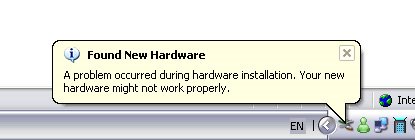 WHAT THE HECK IS HAPPENING!!?
Subscribe to:
Posts (Atom)